How To Change Font for Eclipse Package Explorer

This article shows how to change the Package Explorer text size and style.

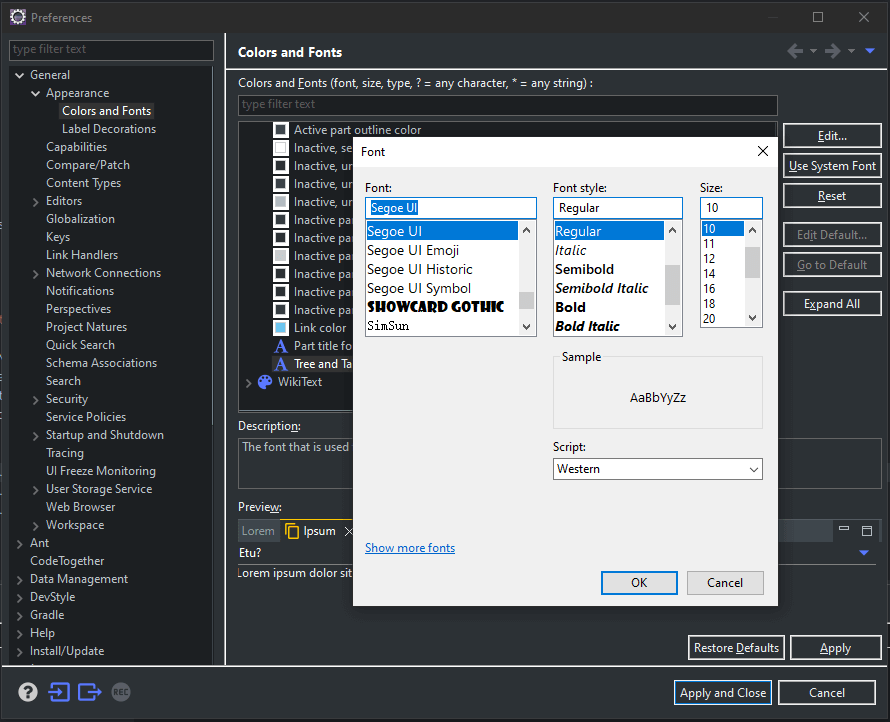
The font used for tree and table views can now be customized with a font preference. This preference is called “Tree and Table font for views” and can be found in Window > Preferences > General > Appearance > Colors and Fonts under the “View and Editor Folders” category.

1
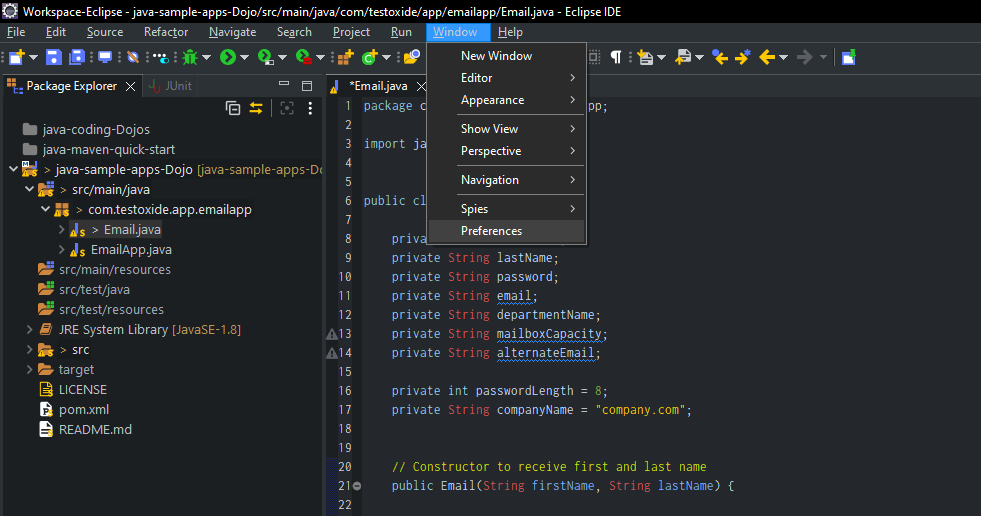
Open Eclipse Preferences

Open the Eclipse Preferences via Window > Preferences

2
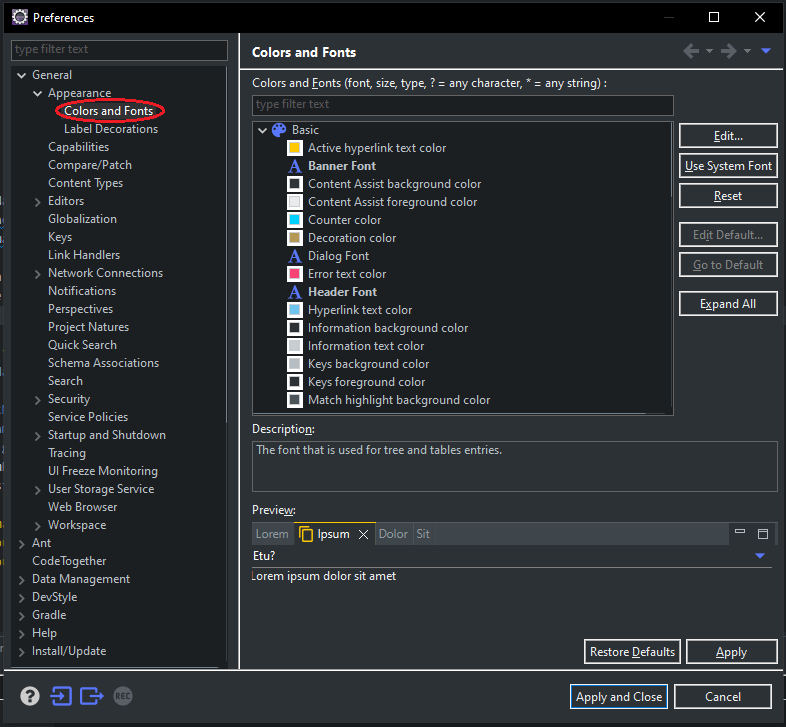
Navigate to Colors and Fonts

Navigate to ‘Colors and Fonts’ on the left-hand side preferences tree view

3
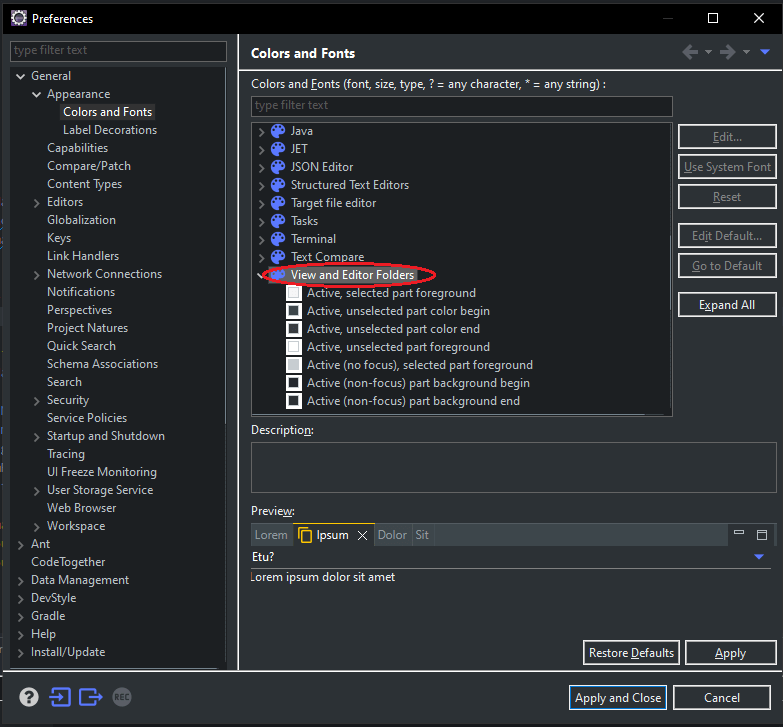
View and Editor Folders Settings

On the right-hand side pane, scroll and locate ‘View and Editor Folders’

4
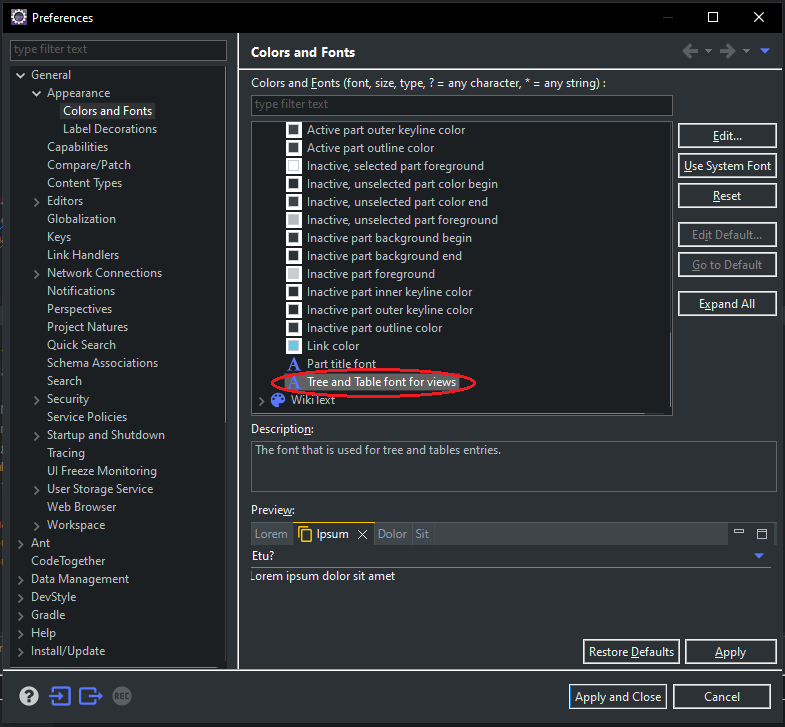
Tree and Table Font Views

Scroll down to ‘Tree and Table Font Views’ under ‘View and Editor Folders’

5
Edit and Set Desired font and styling

6
Click Apply and Close to Save your Settings. DONE!

Re-launch the Eclipse if your changes are not visible.

Tushar Sharma
Tushar Sharmahttps://www.automationdojos.com
Hi! This is Tushar, the author of 'Automation Dojos'. A passionate IT professional with a big appetite for learning, I enjoy technical content creation and curation. Hope you are having a good time! Don't forget to subscribe and stay in touch. Wishing you happy learning!

LEAVE A REPLY

Please enter your comment!
Please enter your name here

This site uses Akismet to reduce spam. Learn how your comment data is processed.

Recent Posts

RELATED POSTS

How To Always Open Files in New Tab in VSCode

The VSCode has rocketed its way to one of the top development IDEs due to its fresh look, usability, tons of feature sets, and...

How To Change Font for Eclipse Editor Pane

This article shows how to change the text size and style for the Eclipse editor pane. The font used for Eclipse editor pane can be...

Shortcut To Auto-Insert ‘main’ Method in IntelliJ

IntelliJ Live Templates Live templates let you insert frequently-used or custom code constructs into your source code file quickly and efficiently IntelliJ IDEA comes with a...

How to View Java API Doc Hints within IntelliJ

IntelliJ Quick Documentation So how do you generally refer your Java API Doc? If you use Google or online Java API Doc or even a...

Â

RECENT 'HOW-TO'

How To Install Oh-My-Posh On Windows PowerShell

Oh-My-Posh is a powerful custom prompt engine for any shell that has the ability to adjust the prompt string with a function or variable. It does not...

MORE ON CODEX

FEATURED PROJECTS

SEPA Bulk File Generator and Validator

ADjo LABS PROJECT: SEPA Bulk File Generator and Validator. Supported File Types PAIN008, PAIN001, PACS003 and PACS008. Tested for supporting PAIN.008.001.001 and PAIN.008.001.002 (version 1&2). The XML...

MORE IN THIS CATEGORY

How To Sort List in Java

Introduction A List is an interface in the Java collection framework. It can be used to store objects. Programmers often encounter scenarios where they need...

How To Convert String To Date in Java

Introduction There are often scenarios in programming, where you will need to convert a date in String format to an actual Date object. For example,...

How To Install Pacman For Git on Windows

The 'Git for Windows' by default does not come with MSYS2 package manager called 'Pacman' and hence it is a limited version or subset...

How To Create FTP Test Plan in JMeter

About File Transfer Protocol File Transfer Protocol is a widely used standard network protocol for FIle sharing between a client and server in the same...

CHECKOUT TUTORIALS

Desired Capabilities in Selenium Web Driver

1. Desired Capabilities in Selenium The performance of a Web application may vary according to different browsers and operating systems. Hence to ship out a...
- Advertisement -spot_img