How To Change Font for Eclipse Editor Pane

This article shows how to change the text size and style for the Eclipse editor pane.

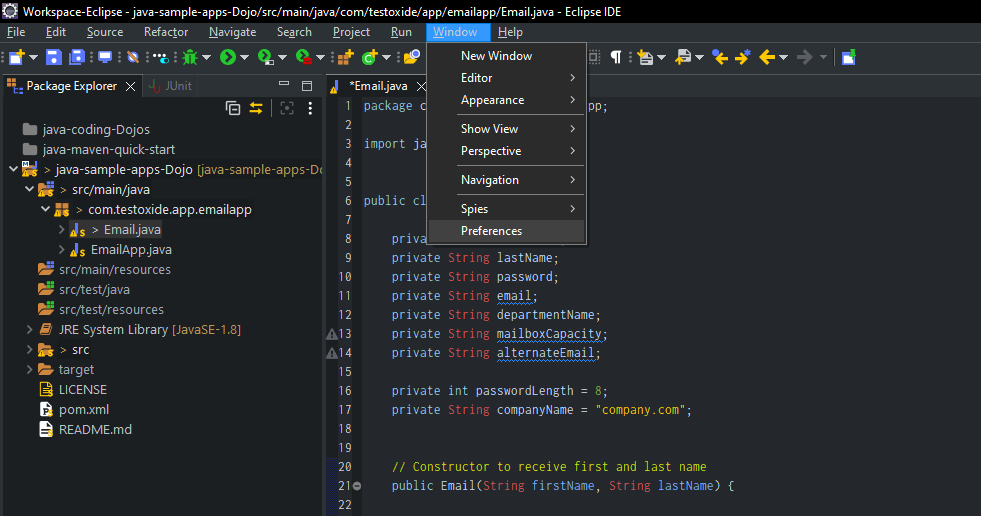
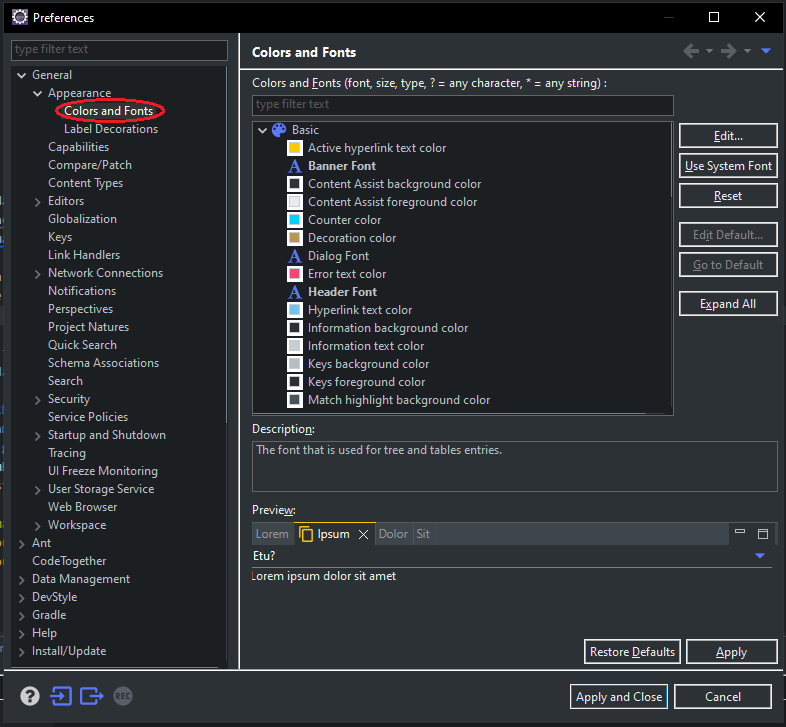
The font used for Eclipse editor pane can be customized with font preference. This preference is located under “Basic” settings and can be found in Window > Preferences > General > Appearance > Colors and Fonts.

1
Open Eclipse Preferences

blank

Open the Eclipse Preferences via Window > Preferences

2
Navigate to Colors and Fonts

blank

Navigate to ‘Colors and Fonts’ on the left-hand side preferences tree view

3
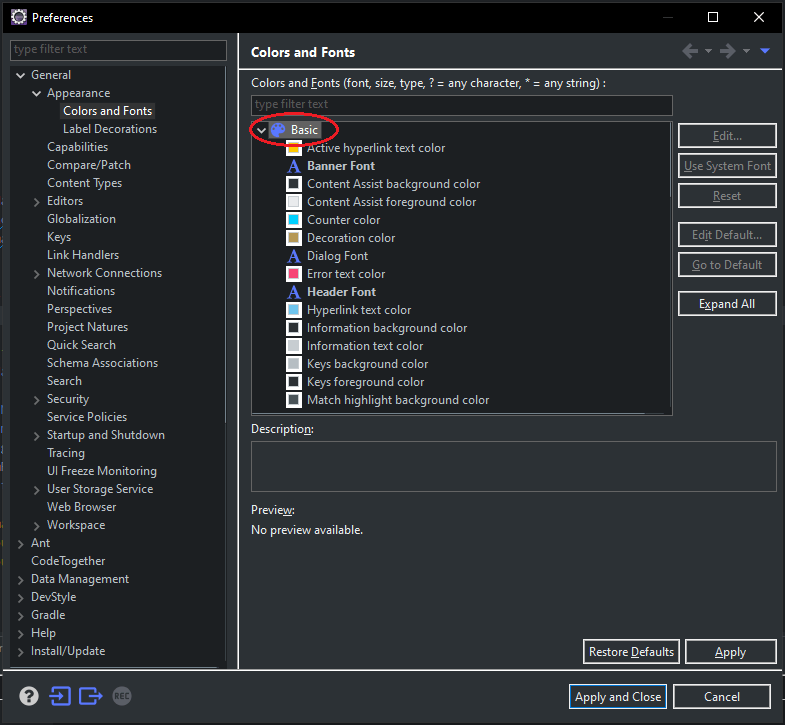
Basic Color and Font Settings

blank

On the right-hand side pane, scroll and locate ‘Basic’

4
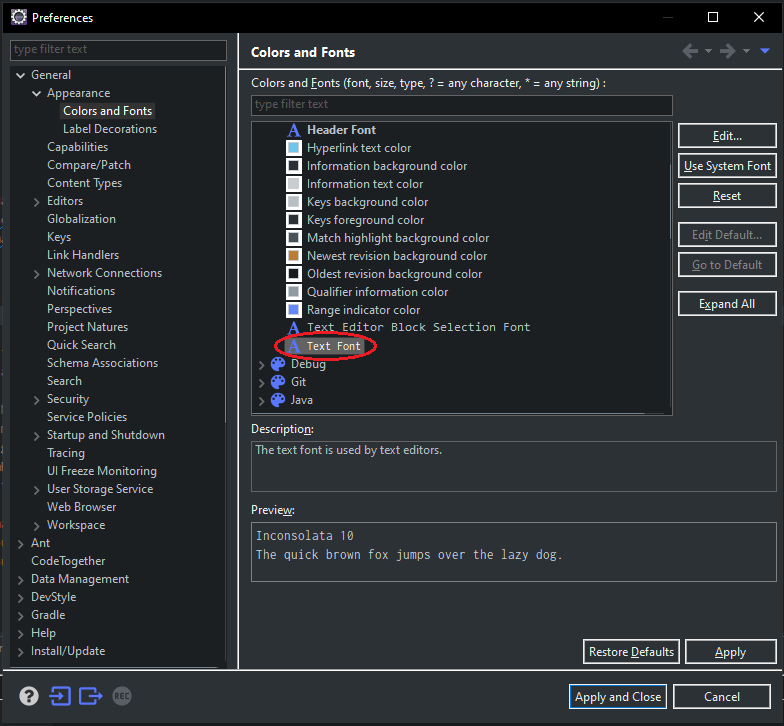
Text Font Settings

blank

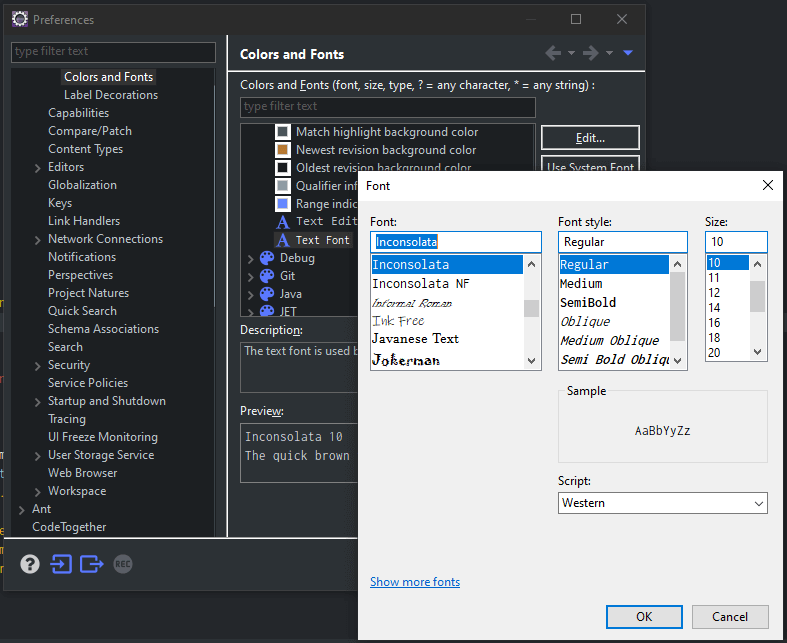
Scroll down to ‘Text Font’ under ‘Basic’

5
Edit and Set Desired font and styling

blank

6
Click Apply and Close to Save your Settings. DONE!

Re-launch the Eclipse if your changes are not visible.

Tushar Sharma
Tushar Sharmahttps://www.automationdojos.com
Hi! This is Tushar, the author of 'Automation Dojos'. A passionate IT professional with a big appetite for learning, I enjoy technical content creation and curation. Hope you are having a good time! Don't forget to subscribe and stay in touch. Wishing you happy learning!

LEAVE A REPLY

Please enter your comment!
Please enter your name here

This site uses Akismet to reduce spam. Learn how your comment data is processed.

Recent Posts

RELATED POSTS

Shortcut To Auto-Insert ‘main’ Method in IntelliJ

IntelliJ Live Templates Live templates let you insert frequently-used or custom code constructs into your source code file quickly and efficiently IntelliJ IDEA comes with a...

How To Always Open Files in New Tab in VSCode

The VSCode has rocketed its way to one of the top development IDEs due to its fresh look, usability, tons of feature sets, and...

How To Create Maven Project in Eclipse With Archetype

Maven Basics Maven automates the steps involved in building a software application like adding the JAR files, compiling code, running unit tests, creating the output...

How To Add SSH Private Keys to Eclipse

One of the common use cases for accessing Git repositories on Github is authentication via SSH keys. This offers a secure way of working...

Â

RECENT 'HOW-TO'

How To Install Oh-My-Posh On Windows PowerShell

Oh-My-Posh is a powerful custom prompt engine for any shell that has the ability to adjust the prompt string with a function or variable. It does not...

MORE ON CODEX

FEATURED PROJECTS

Windows JDK Manager (win-jdk-Manager)

ADjo LABS PROJECT : Simple and lightweight desktop utility with Interactive cmd Interface for easy view, re-point and switching between JAVA versions on windows. Demonstrating the capability...

MORE IN THIS CATEGORY

How To Record Using BlazeMeter Plugin (JMeter)

Honestly speaking if you already have a mature or established process using 'native' JMeter from Apache, without any kind of wrappers utilities or third-party...

How To Install XAMPP on Windows

What is XAMPP The full form of XAMPP stands for Cross-platform, Apache, MariaDB (MySQL), PHP and Perl. It is one of the simplest and lightweight...

How To Find Broken Links with Selenium

What is a broken link? Links are used for navigating between webpages. Users are directed to a web page when they click or type a...

How To Concatenate Strings in Java

Introduction In Java, a String is a sequence of characters. There are often programming situations where you will need to concatenate Strings. There are several...

CHECKOUT TUTORIALS

Working with Selenium WebElements

Table of Contents 1. Selenium WebElements 2. WebElement Locators 3. Working With Text Box 4. Working With Buttons 5. Checkboxes and Radio Buttons 6....
- Advertisement -spot_img