How To Create Maven Project in Eclipse Without Archetype

Getting started with Apache Maven in Eclipse

Maven is a very popular build and dependency management tool. Eclipse is an IDE that helps developers write and run Java code easily. In this article, I will be explaining how you can create a Maven project in Eclipse.

Maven Basics

Maven automates the steps involved in building a software application like adding the JAR files, compiling code, running unit tests, creating the output jar/war file, etc. This makes the code less error-prone. Maven uses an XML configuration file known as the POM file. Developers need to specify information like the JAR files required by an application, the type of output artifact (jar,war, etc). Maven then uses the instructions in the POM file to build the application.

Eclipse Maven Integration

Most of the recent Eclipse releases already include Maven. So, developers do not need to do anything special to install Maven in Eclipse.  However, some earlier versions of Eclipse do not include Maven, so it needs to be installed explicitly from the Eclipse marketplace. Once Maven is set up with Eclipse, it allows you to easily create a Maven project and use all the Maven features like dependency resolution within Eclipse itself.

Creating a Simple Maven Project

In order to create a simple Maven project in Eclipse, the following steps need to be followed:

1
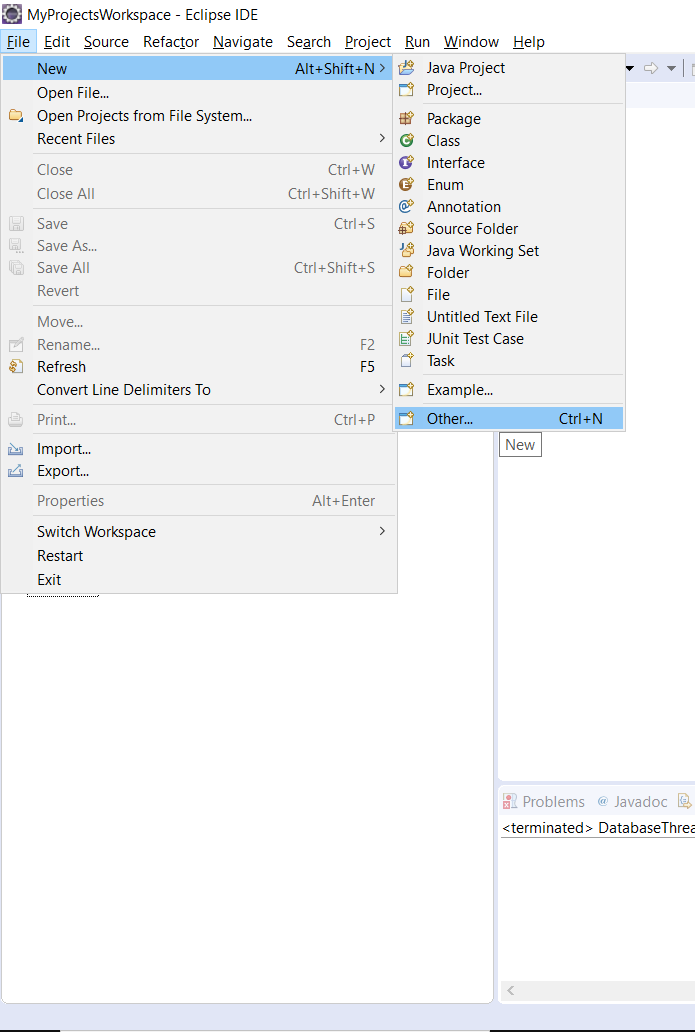
Create new artefact of type ‘Other’

From menu File > New select ‘Other’

2
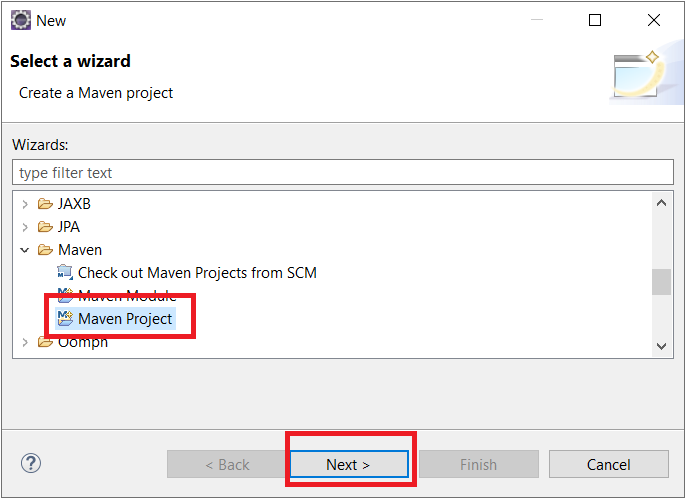
Select Maven Project. Click Next

On the ‘new project’ wizard select ‘Maven Project’

3
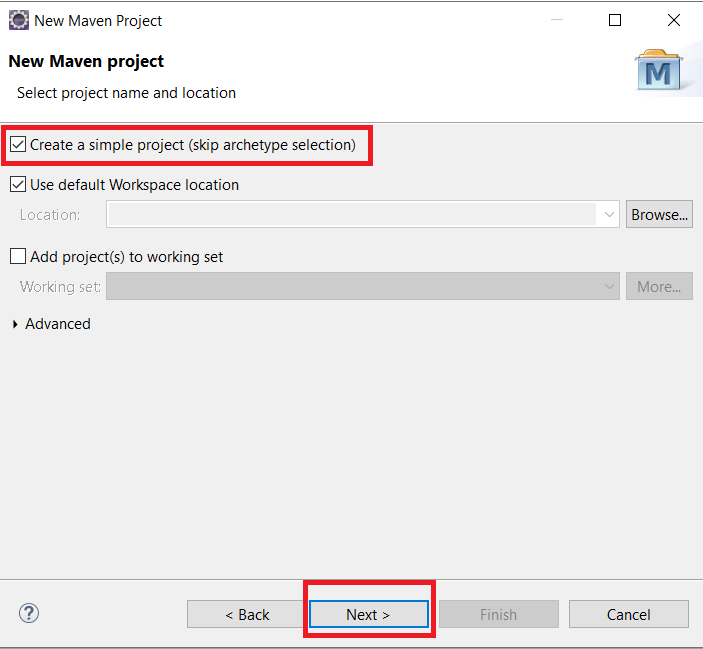
Select ‘Create a Simple Project’

Click the Create a Simple Project (skip archetype selection) checkbox. Click Next

4
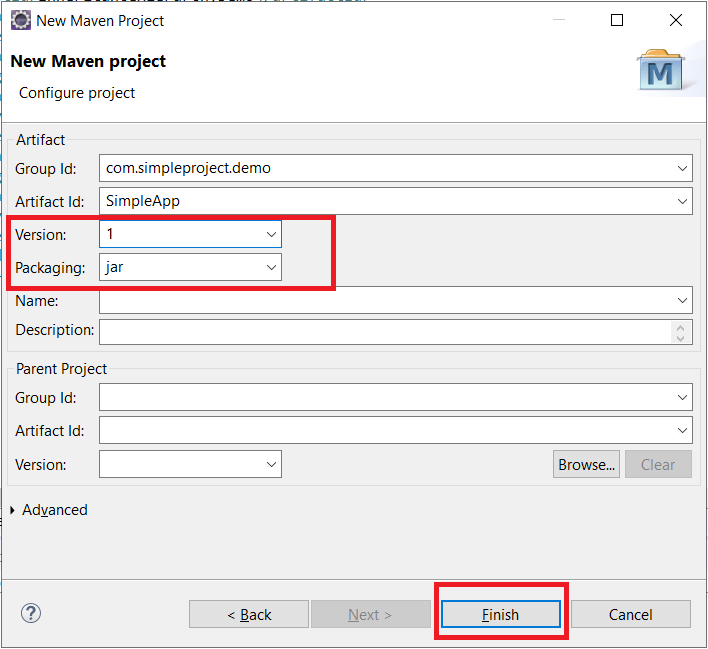
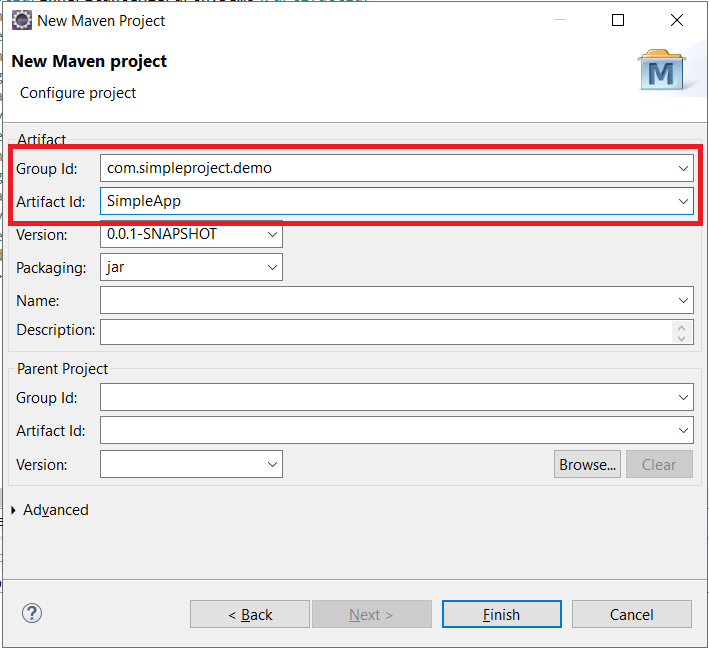
Enter value for Group Id & Artifact Id.
5
Change version and packaging

Change version and packaging if required (This is an optional step). Click Finish

6
New Maven Project Created

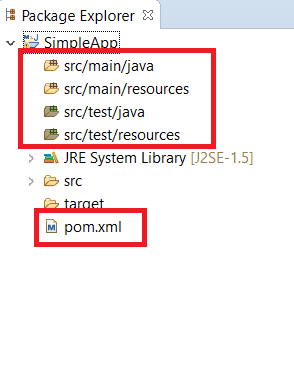
This creates a Maven project in Eclipse with the Maven directory structure and POM file as follows

7
View Your POM File

The default POM created has the group id, artifact id, version and packaging specified at the time of creation as follows

8
Finish!

This POM file can then be modified by adding dependencies and other information as required.


Tushar Sharma
Tushar Sharmahttps://www.automationdojos.com
Hi! This is Tushar, the author of 'Automation Dojos'. A passionate IT professional with a big appetite for learning, I enjoy technical content creation and curation. Hope you are having a good time! Don't forget to subscribe and stay in touch. Wishing you happy learning!

LEAVE A REPLY

Please enter your comment!
Please enter your name here

This site uses Akismet to reduce spam. Learn how your comment data is processed.

Recent Posts

RELATED POSTS

Format Decimal Numbers Using Pattern

The java.text.DecimalFormat class is used to format numbers using a user specified formatting. This concrete subclass of NumberFormat, allows formatting decimal numbers via predefined...

Java Tutorial #6 – Jump Statements

Introduction The break statement is used to stop further execution. It can be used either in a loop or within a switch statement. Break Statement The break...

Format Decimal Numbers Using Locale

If you want to create a DecimalFormat instance for a specific Locale, create a NumberFormat and cast it to a DecimalFormat. The java.text.DecimalFormat class is...

Remove Duplicates from List Using LinkedHashSet

Another implementation of the Set interface is LinkedHashSet. LinkedHashSet maintains the order of elements and helps to overcome the HashSet limitation. The following code...

Â

RECENT 'HOW-TO'

How To Install Oh-My-Posh On Windows PowerShell

Oh-My-Posh is a powerful custom prompt engine for any shell that has the ability to adjust the prompt string with a function or variable. It does not...

MORE ON CODEX

FEATURED PROJECTS

SEPA Bulk File Generator and Validator

ADjo LABS PROJECT: SEPA Bulk File Generator and Validator. Supported File Types PAIN008, PAIN001, PACS003 and PACS008. Tested for supporting PAIN.008.001.001 and PAIN.008.001.002 (version 1&2). The XML...

MORE IN THIS CATEGORY

Java Tutorial #2 – Operators in Java

Table of Contents Introduction 1. Assignment Operator 2. Arithmetic Operators 3. Compound Operators 4. Increment & Decrement Operators 5. Relational Operators 6. Logical Operators Introduction Operators are an essential...

What is In-Proc and Out-Proc (COM) ?

The terms 'In-Proc' and 'Out-Proc' are to describe the kind of implementation of COM Servers. Before we begin, for those who are not quite...

COM Components and Scripting Process

Although this article should not concern you at all as a 'script developer' as long as you are aware of creating a reference to...

VBS Part 2 – Fundamentals and Concepts

Having gone through the Introductory part, it is time to look at some crucial fundamentals and concepts. This article is to refresh some of...

CHECKOUT TUTORIALS

Desired Capabilities in Selenium Web Driver

1. Desired Capabilities in Selenium The performance of a Web application may vary according to different browsers and operating systems. Hence to ship out a...
- Advertisement -spot_img