




Although this article should not concern you at all as a ‘script developer’ as long as you are aware of creating a reference to ‘Automation Objects’ but for people with an appetite to look behind the scenes, it is quite recommended! Moreover it is always useful to know what, indeed happens when you are creating an instance of any COM object in your script.
In this article, we discuss the ‘COM Object instantiation’ and ‘Binding’ process. But before we go through this article it would be a good idea to have a look at COM and Scripting Fundamentals posted earlier in this article ‘In-Proc and Out-Proc‘ or refer to ‘Glossary’ page for a quick brush-up of related terms.
The COM Registration Process
This story starts when an application or library is installed on the operating system. During the installation, this library or application ‘registers‘ itself with the operating system just like ‘regsvr32‘ command if you are aware of it. The idea behind this registration is for the system to know that
- A new ‘COM Server‘ is available for use and
- What ‘COM Classes’ this COM Server has to offer.
There are some keys which get added at the location – ‘HKEY_CLASSES_ROOT‘ in the registry for each new ‘Object Class’. Among these keys is present one significant key called the ‘Programmatic Identifier‘ (ProgID). This ‘ProgID‘ is the short text which identifies the name given to the respective object class and hence this is the text we use in the command (CreateObject or GetObject) for creating the instance of the COM Object. For example; for creating an instance of ‘Scripting Runtime Library‘ you may use the ‘ProgID’ syntax as –
Set MyObject = CreateObject("Scripting.FileSystemObject")
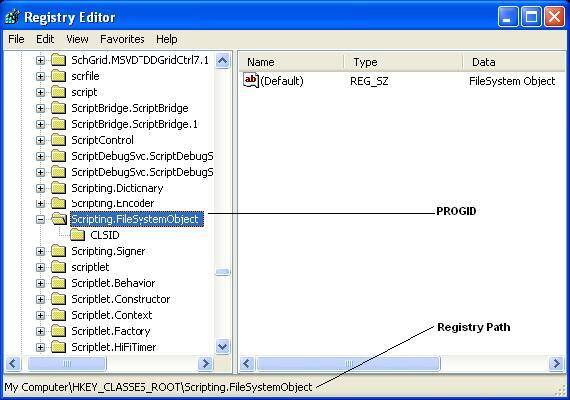
This ‘ProgID‘ is all the information which the system needs to locate and instantiate the COM object. The section below describes the process of locating and instantiation of COM Object.
COM Instantiation Process
Upon the execution of ‘CreateObject’ command as in above example, the ‘Script Engine’ parses the ‘ProgID’ and passes it to a ‘COM API’ which in turn is responsible for creating the object reference. The steps below explain the remaining process –
- The ‘COM API‘ searches the ‘HKEY_CLASSES_ROOT‘ section of the registry for the subkey with the same name as the ProgID.
- If the above subkey is located then the COM API searches for another subkey called the class ID (CLSID) in the ‘HKEY_CLASSES_ROOT’ section. This ‘CLSID‘ is a globally unique identifier (GUID) of the Automation Object.
- Once the system locates the ‘GUID‘, it makes a note of it since this GUID is what the system uses in future to track and use the object.
- With this GUID the system searches the following registry location – ‘HKEY_LOCAL_MACHINE\SOFTWARE\Classes\CLSID‘ to retrieve the necessary information like the location of the executable or library file name.
- Finally, the ‘COM API’ loads the relevant application or library file name as deduced above, creates the object and returns the reference to the calling script.
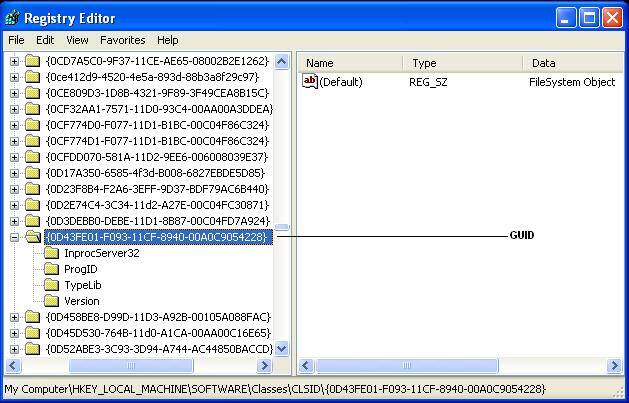
On the last note – If you are wondering what’s the difference between ProgID and GUID? The answer is that they are more or less aliases. Since the ProgID is easier for developers to remember and use, it is used by them while the cryptic GUID is used by the system. Both of them point to the same automation object in a given scenario.






Kiran, you should consider using the ‘regsvr32’ command on windows to register / unregister any .dll or ActiveX into windows registry. Its usage is very plain and simple, refer to microsoft documentation if required.
For quick reference the syntax is – ‘regsvr32.exe sample.dll’
What if the COM Server (.dll) to which I would like to bind is not executable or is not a part of the any application install. How can I use such custom COMs?
Thanks